Role Assignment
Step 1:
Navigate to: Administration > Site administration > Users > Permissions > Define roles.
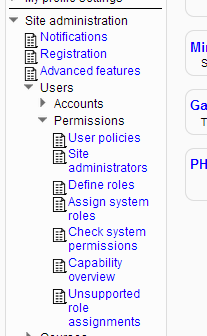
Step 2:
Click on Allow role assignment and make the necessary changes.

Step 3:
Save the changes.

Blog · Moodle

Role Assignment
Step 1:
Navigate to: Administration > Site administration > Users > Permissions > Define roles.
Step 2:
Click on Allow role assignment and make the necessary changes.
Step 3:
Save the changes.
Keep reading

Introduction: In traditional way most of the organizations host their moodle app in the single server, which includes Application/DB even though maintaining the server to be a backup (application/db) still
4 Mar 2020 · 5 min read

Moodle Customization's : Enrolled courses and Related Search functions INTRODUCTION The focus of our study is regarding customizing the course category such that only enrolled courses will be visible when
18 Feb 2016 · 2 min read

Course Request. Step 1: Configure the Request T setting by Navigating to: Site Administration → Courses → Course Request. Step 2: Save the changes and log in from Teachers account.
17 Feb 2016 · 1 min read
Request a quote
A senior engineer replies within one working day.